UV printing machines are digital printing systems that use ultraviolet light to cure specially formulated inks during the printing process.
Unlike conventional printing methods that may require extended drying periods, UV printing uses UV light to harden the ink shortly after it is deposited onto a surface. This process helps produce sharp images, detailed graphics, and durable printed designs across a wide range of materials.
UV printing technology is used in advertising, packaging, product customization, signage, interior decoration, electronics, and industrial manufacturing. Depending on the machine configuration, it can print on materials such as acrylic, glass, wood, metal, plastic, ceramic, and selected coated surfaces. Some machines also support printing on paper, cardboard, promotional products, and other flat or specially shaped objects.
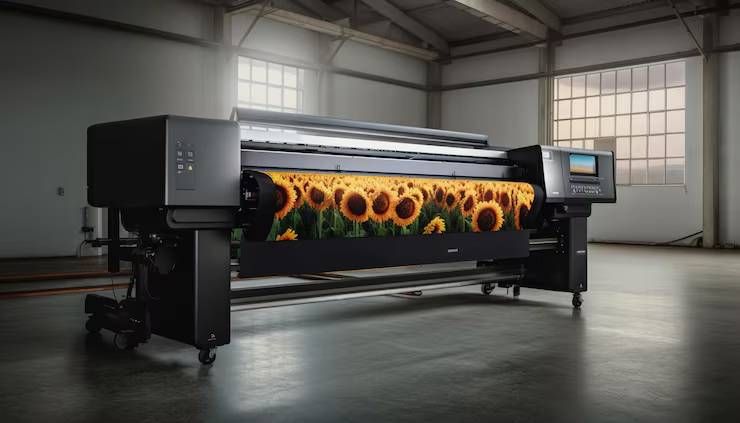
A typical UV printing system includes a printhead, ink delivery system, UV curing lamps or LEDs, a control interface, and software for preparing digital artwork. Many machines use piezoelectric inkjet printheads to deposit small droplets of ink accurately onto the selected material. The UV light then cures the ink, forming a solid layer on the surface.
Different UV printers are designed for different applications. Flatbed printers handle rigid materials, roll-to-roll printers work with flexible media, and hybrid systems can process both rigid and flexible substrates. Specialized cylindrical or rotary attachments can print on objects such as bottles, tubes, and other curved products.
The choice of machine depends on the required print size, production volume, material compatibility, image quality, and intended application.
Importance
UV printing machines are important because they allow businesses and manufacturers to create customized graphics on diverse materials while maintaining precise digital control over the printing process.
1. Printing on Different Materials
One of the main advantages of UV printing is its versatility. Depending on the ink formulation, surface preparation, and printer design, it can produce graphics on rigid and flexible materials.
For example, a signage manufacturer may print logos on acrylic panels, while a product manufacturer may use UV printing to add decorative designs to plastic housings. Some applications require primers, surface treatments, or specialized inks to improve adhesion.
Material compatibility should always be confirmed before production because not every UV ink adheres equally well to every surface.
2. Fast Ink Curing
UV curing allows printed ink to harden quickly under ultraviolet light. This can reduce waiting time between printing and subsequent handling, especially in workflows that would otherwise require longer drying periods.
The actual production speed depends on image coverage, resolution, print mode, material properties, and curing settings. Complex designs or multiple printing layers may require additional processing time.
3. Detailed and Colorful Graphics
Modern UV printers can reproduce fine text, detailed images, gradients, and colorful designs. Many systems support white ink, which helps create visible graphics on dark or transparent materials. Some also support clear varnish or specialty effects for selected applications.
These capabilities are useful for decorative panels, branded merchandise, product labels, and customized packaging. Consistent results depend on correct color management, printhead condition, and suitable artwork preparation.
4. Customized Product Manufacturing
Digital UV printing makes it possible to produce short runs and personalized items without creating traditional printing plates. Businesses can change artwork between individual products or small batches.
Applications include personalized gifts, branded promotional products, phone accessories, nameplates, decorative objects, and customized corporate materials. This flexibility is particularly useful when different designs are needed within the same production schedule.
5. Efficient Production Workflows
UV printing can integrate digital artwork preparation, automated material positioning, and computer-controlled printing. Some machines include vacuum tables, alignment systems, height sensors, and production software to support repeatable results.
These features can reduce certain manual steps, although operators still need to prepare materials, verify artwork, maintain equipment, and inspect finished products.
Recent Updates
UV printing technology continues to develop through improvements in LED curing, printhead performance, automation, ink formulations, and production software. Developments during 2025 and 2026 reflect wider trends in digital manufacturing, although specific features and availability differ among manufacturers and models.
1. Increased Use of UV LED Curing
UV LED systems use light-emitting diodes to cure compatible inks. Compared with some traditional UV lamp arrangements, LED systems can provide lower heat output, longer operating life, and more controlled curing. Their actual energy use and performance depend on the equipment and operating conditions.
Lower heat exposure can be useful when printing on certain temperature-sensitive materials. However, correct wavelength, curing intensity, and ink compatibility remain essential for reliable results.
2. Improved Printhead Performance
Printer manufacturers continue to develop inkjet technology aimed at improving droplet placement, image detail, production speed, and consistency. Better control over ink deposition can support fine graphics, small text, and more complex color combinations.
Print quality still depends on the complete system, including printhead configuration, ink formulation, media handling, software settings, and maintenance practices.
3. Greater Automation
Some newer systems include automatic height detection, alignment assistance, material-positioning features, and software-based production controls. These functions can help operators prepare print jobs and reduce positioning errors.
Automated features are especially useful when producing multiple items with similar dimensions. Irregularly shaped objects may still require manual adjustment, specialized fixtures, or additional testing.
4. Expansion of Specialty Printing Effects
White ink, clear varnish, textured layers, and selective gloss effects allow manufacturers to create more varied surface appearances. Multiple printing layers can produce raised details or decorative effects on suitable substrates.
These features can expand applications in product decoration, interior graphics, packaging prototypes, and personalized merchandise. They may also increase ink consumption and require additional printing passes.
5. Software Integration and Digital Workflow Management
Printing software increasingly supports color management, job preparation, layout optimization, and production tracking. Some workflows also connect artwork preparation with business systems that manage customer orders and production schedules.
Accurate digital files and suitable color profiles remain important. Operators should verify output settings and maintain version control to prevent incorrect artwork or inconsistent colors.
Laws or Policies
UV printing businesses should consider workplace safety, chemical handling, environmental requirements, electrical safety, and intellectual property rules. The exact obligations depend on the location, equipment, ink formulation, production process, and type of business.
1. Workplace Safety and UV Exposure
Ultraviolet radiation can harm the eyes and skin. UV printing machines should have suitable shielding, interlocks, and other protective features appropriate to their design. Operators should never bypass safety mechanisms or look directly at exposed UV curing sources.
Equipment should be installed and operated according to the manufacturer's instructions. Workers should receive training on safe operation, maintenance procedures, and emergency shutdown methods.
2. Ink Handling and Chemical Safety
UV inks, primers, cleaning fluids, and related chemicals may contain substances that can irritate the skin or eyes. Some uncured UV inks can cause skin sensitization after repeated exposure.
Workers should consult safety data sheets and follow instructions for storage, ventilation, protective gloves, eye protection, spill management, and waste handling. Uncured ink should not be treated as harmless simply because the finished print has been cured.
3. Environmental Requirements in India
Printing operations may need to follow applicable waste-management, air-quality, water-discharge, and local environmental requirements. Businesses should determine whether their activities require approvals or consent from the relevant State Pollution Control Board or other authority.
Ink residues, contaminated cleaning materials, and other chemical waste should be handled according to applicable rules rather than poured into ordinary drains. Requirements vary according to the materials used and the nature of the operation.
4. Electrical and Machinery Safety
UV printers combine electronic controls, motors, moving parts, and curing systems. Proper grounding, suitable electrical protection, safe cable management, and manufacturer-approved maintenance procedures help reduce workplace hazards.
Before cleaning or repairing a machine, operators should follow the specified shutdown and isolation procedures. Only appropriately trained personnel should perform work involving electrical components or internal curing equipment.
5. Copyright and Design Rights
Businesses printing logos, illustrations, photographs, or branded graphics should confirm that they have the necessary permission or rights to reproduce the material. Copyright and trademark rules may apply to commercial printing, customized merchandise, and promotional products.
Customers' supplied artwork should be reviewed when there are reasonable concerns about unauthorized reproduction. Applicable requirements depend on the jurisdiction and the particular design.
Tools and Resources
Selecting a UV printing machine requires careful evaluation of production needs, material types, print dimensions, ink configuration, and maintenance requirements.
1. UV Flatbed Printers
Flatbed printers use a stationary or supported printing surface to hold rigid materials during printing. They are commonly used for acrylic sheets, wood panels, glass, metal plates, selected plastics, and decorative boards.
Vacuum tables can help secure flat materials, while adjustable printhead height can accommodate different substrate thicknesses. Buyers should check the maximum printable area and supported material dimensions.
2. Roll-to-Roll UV Printers
Roll-to-roll printers process flexible materials supplied on rolls. Typical applications include banners, films, labels, wallpaper, and selected flexible graphics.
These machines are useful for continuous media workflows. Material tension, ink adhesion, and the compatibility of the substrate with the ink are important factors in maintaining print quality.
3. Hybrid UV Printers
Hybrid printers support both rigid sheets and flexible media, depending on their configuration. They can be suitable for businesses producing a mixture of signage, decorative panels, and flexible graphics.
Their versatility should be weighed against the available production space, material-handling requirements, and expected workload.
4. Rotary UV Printing Systems
Rotary attachments or specialized cylindrical printers allow graphics to be applied to curved objects such as bottles, tubes, and cylindrical containers. The object is rotated in coordination with the printhead to maintain image alignment.
The supported diameter, object shape, surface finish, and positioning method should be checked before selecting a rotary configuration.
5. UV Ink Systems
UV inks are formulated to cure under specified ultraviolet wavelengths. Common configurations include CMYK colors, white ink, and clear varnish, although available options vary by machine.
Ink selection should match the printer's specifications and the intended substrate. Using incompatible ink may cause poor adhesion, curing problems, or equipment damage.
6. RIP Software and Color Management
Raster image processor (RIP) software converts artwork into instructions the printer can use. Depending on the system, it may manage color profiles, white-ink layers, print resolution, image placement, and multiple printing passes.
Correct file preparation and calibration are important for consistent output across different materials and production runs.
7. Maintenance and Cleaning Equipment
Routine maintenance may include printhead cleaning, nozzle checks, ink-system inspections, and cleaning of approved machine components. Manufacturers may specify particular cleaning fluids and procedures.
Operators should avoid improvised cleaning methods because incorrect products or handling can damage printheads and other sensitive components.
How to Choose the Right UV Printer
Before selecting a machine, businesses should evaluate the following factors:
- Application: Identify whether the main work involves signage, packaging, product decoration, or customized merchandise.
- Print dimensions: Confirm the maximum image area and supported material thickness.
- Production volume: Compare print speed, setup time, and expected daily workload.
- Ink configuration: Determine whether white ink, clear varnish, or specialty colors are required.
- Material compatibility: Test adhesion, curing, flexibility, and durability on intended substrates.
- Maintenance: Review printhead upkeep, replacement-part availability, and technical support.
- Safety: Check UV shielding, interlocks, chemical-handling instructions, and ventilation needs.
- Total operating requirements: Evaluate ink consumption, electricity, software, maintenance, and operator training.
A practical approach is to test representative materials and artwork before committing to a production configuration.
FAQs
1. What is a UV printing machine?
A UV printing machine is a digital printer that uses ultraviolet light to cure specially formulated ink as it is deposited onto a surface. It can print graphics on many rigid and flexible materials, subject to compatibility.
2. Which materials can UV printers print on?
Depending on the machine and ink, UV printers may handle acrylic, glass, wood, metal, selected plastics, ceramics, films, and other materials. Surface preparation and adhesion testing may be necessary for some substrates.
3. What is the difference between UV printing and traditional printing?
UV printing cures ink with ultraviolet light during the printing process. Some traditional printing methods rely on evaporation, absorption, or other drying processes. UV printing also enables digital customization without requiring traditional printing plates for each design.
4. Is UV printing durable?
UV prints can provide good resistance to handling and environmental exposure, but durability varies according to ink formulation, substrate, curing quality, and exposure conditions. Some applications may require protective coatings or additional testing.
5. What is the difference between a UV flatbed printer and a roll-to-roll printer?
A flatbed printer is designed primarily for supported rigid materials, while a roll-to-roll printer processes flexible media from rolls. Hybrid systems may accommodate both formats.
6. Are UV printing machines safe to operate?
They can be operated safely when designed with suitable safeguards and used according to manufacturer instructions. Workers must avoid UV exposure, handle uncured inks carefully, and follow appropriate electrical and chemical safety procedures.
7. What maintenance does a UV printer require?
Maintenance commonly includes nozzle checks, printhead cleaning, ink-system inspection, cleaning of approved surfaces, and checks of curing and positioning systems. The schedule depends on the model, ink system, and frequency of use.
Conclusion
UV printing machines have become useful tools for digital printing, product decoration, signage, packaging, and customized manufacturing. Their ability to cure ink quickly and print on a variety of compatible materials makes them suitable for both specialized production and flexible short-run work.
Advances in UV LED curing, printhead technology, automation, and specialty printing effects continue to expand their applications. However, successful results depend on choosing suitable equipment, matching inks to substrates, preparing artwork correctly, and maintaining the machine according to manufacturer guidance.
Businesses should also account for worker safety, chemical handling, environmental responsibilities, and intellectual property rights. By evaluating these factors before installation, operators can select a UV printing system that meets their production needs and supports consistent output.